Categories
News

What are the COVID-19 Alert Level 1 Guidelines we need to know?

Written by: Aiya Rodjel

For the past two years, the country has constantly been monitoring the latest guidelines set by the Inter-Agency Task Force for the Management of Emerging Infectious Diseases. Since the worldwide pandemic was first announced, people in the country have been on the lookout for the government’s latest guidelines.

At first, only the National Capital Region was affected by the alert level system. Public transportation became limited, and health centers were restricted. All the agencies of the government had to band together for the best way to move forward. Needless to say, everything has changed.

Having access to fiber internet for home from a robust internet provider in the Philippines has been key for everyday people and businesses to be updated with the latest alert level status in the country. The alert level system has guided the general public on how to go about their business and daily lives. At the end of February, the IATF announced that there would be a nationwide implementation for Alert level 1. What does this mean exactly?
Subscribe to Streamtech Fiber Internet

What are the minimum public health standards for Alert Level 1?

According to the IATF’s guidelines for alert level 1, there are no indoor and outdoor capacities restrictions. Essentially, restaurants and other accommodation establishments can accommodate up to full seating capacity. Everyone can travel within the city or country without restrictions.

In turn, indoor establishments such as concert halls and private offices are allowed to operate at full capacity. On-site work is permitted as long as proper preventive measures are followed.

Meanwhile, face-to-face classes for primary education are still up to the discretion of the president’s office. College and secondary classes are expected to resume shortly.

While being under Alert level 1 gives the impression that things are back to normal, there are still rules to be followed. There are still relevant rules to be followed to safeguard the health and safety of people.

Protocols to be observed under Alert level 1

  • Regardless of vaccination status, everyone above the age of two is expected to wear well-fitted masks at all times. This rule applies to outdoors or in indoor private or public establishments. However, there are certain exceptions to this rule. People can take off their masks when eating, drinking, or participating in indoor or outdoor sports.
  • All private offices and workplaces, including public and private construction sites, are allowed to operate at full capacity. This is consistent with national issuances on vaccination requirements for on-site work. On the other hand, alternative work arrangements subject to hybrid or work-from-home setup are allowed.
  • Agencies and other government instrumentalities can function at total capacity under Alert Level 1. Off-site work is subject to the relevant rules and regulations issued by the Civil Service Commission and the Office of the President.
  • Public transportation in areas under alert level 1 is permitted to function at total capacity. When it comes to intrazonal and interzonal travel, passenger capacity will be subject to the lower passenger capacity rate between the point of origin and destination.

COVID-19 Rules under Alert level 1

  • In terms of contact tracing, establishments are not required to have health declaration forms. However, digital contact tracing apps are still optional.
  • On testing prioritization, the government will still implement testing protocols, especially for unvaccinated or with a higher exposure risk. RT-PCR testing kits are recommended, especially for private clinics and healthcare workers.
  • The Hospital Infection Prevention and Control Committees (HIPCC) have the authority to implement testing protocols and relevant processes in health care facilities.
  • Establishments are no longer required to set up isolation facilities within the workplace.
  • People with mild to moderate COVID-19 cases will be managed by primary level care. Meanwhile, patients with severe and critical symptoms will be handled in the appropriate health care facility.
  • For the purpose of claiming sick leave, a medical certification suffices as evidence for COVID-19 management.
  • People above 18 must present proof of vaccination when entering mass gatherings or indoor establishments. These establishments are not limited to the following:
    • In-person religious gathering; gatherings for necrological services, wakes, inurnment, and funerals for those who died of causes other than Covid-19 and for the cremains of the Covid-19 deceased
    • All indoor dining services of food preparation establishments
    • All indoor personal care establishments
    • Fitness studios, gyms, and venues for exercise and sport
    • All indoor cinemas and movie houses at total capacity
    • Meetings, incentives, conferences, exhibition events, and permitted venues for social events like engagement parties and the like.
    • Venues for election related events

Keeping up with the Inter-Agency Task Force

Since the pandemic was first announced, a lot has changed. There have been amended guidelines to help businesses cope with the losses of the pandemic. Other relevant processes have been implemented to help the public remain productive. Even rules on public land transportation have changed in so many ways.

All of these rules have been imposed for the health benefits of the general public. However, keeping up with the latest rules and protocols can be challenging. That is why you need fiber internet for home.

With a reliable internet provider in the Philippines like Streamtech Technologies, you have access to high-speed internet at an affordable price. It’ll be easier for you to keep yourself updated on the latest rules when accessing the internet. You can also keep yourself productive even if you’re just at home.

With high-speed internet, businesses can continue their operations while following the rules imposed by the government. At the same time, you can access all relevant government links for your various needs.

Whether you’re a student, business owner, or member of the Philippine workforce, you benefit tremendously by investing in high-speed internet. That’s why you should entrust your fiber internet for home with Streamtech. Contact our team today to get started.

Categories
News

Awesome News: Why DepEd Gives Adobe CC Licenses to Schools

Written by: Aiya Rodjel

Navigating through the online learning world has many challenges. That is why educators across the globe are constantly bettering themselves to provide students with the best education possible. Being tech-savvy in the digital space is no longer a luxury but a need.

The majority of industries have modernized to adopt the latest tools of technology. To prepare students and teachers for the demands of the modern workforce, the Department of Education (DepEd) has distributed annual Adobe creative cloud licenses to public schools nationwide.

This article will discuss the rationale behind this decision, alongside its significance to learners today. As long as teachers and students have access to high-speed internet through a robust internet provider in the Philippines, they can maximize their license to Adobe Creative Cloud.

What is Adobe Creative Cloud?

Navigating through the online learning world has many challenges. That is why educators across the globe are constantly bettering themselves to provide students with the best education possible. Being tech-savvy in the digital space is no longer a luxury but a need.

The majority of industries have modernized to adopt the latest tools of technology. To prepare students and teachers for the demands of the modern workforce, the Department of Education has distributed annual Adobe creative cloud licenses to public schools nationwide.

This article will discuss the rationale behind this decision, alongside its significance to learners today. As long as teachers and students have access to high-speed internet through a robust internet provider in the Philippines, they can maximize their license to Adobe Creative Cloud.

What is Adobe Creative Cloud?

Source: Szabo Viktor from Unsplash.com
https://unsplash.com/photos/2yQTxjC01JY

To understand the relevance of the availability of Adobe Creative Cloud licenses, you must know what this creative app is all about. Essentially, the Creative Cloud app is a collection of over twenty apps that can be used for photography, design, web, UX, and social media.

With these creative cloud apps, students can experiment with color palettes, font families and even collaborate with other people. They can edit and enhance gorgeous photographs, videos, graphics, and user experiences for functionality and to showcase their creativity.

Knowledge in Adobe CC gives competitive graduates an edge in this modern world. Photoshop is among the most widely used photography computer and mobile applications around. Illustrator allows you to create gorgeous vector art and illustrations on desktop and iPad.

Meanwhile, InDesign is a software that enables users to design and publish and publish elegant layouts for print and digital. Premiere Pro gives people the power to edit videos with industry-standard professionalism. Adobe XD allows people to design, prototype, and share user experiences for web, mobile, voice, and more.

Access to Adobe Creative Cloud can be a total game-changer in this creative development era. As long as you have fiber internet for home, you can try the Creative Cloud for free and cancel within 14 days. However, Adobe CC licenses allow people to freely maximize these apps and services.

Why did the Department of Education distribute these licenses?

The primary reason the Department of Education partnered with Adobe to make this significant move happen is to enhance the digital literacy skills of teachers and learners. Alongside the Creative Nation Academy, students’ knowledge from these creative apps can be applied even beyond students’ schooling years.

With these shared device licenses, anyone can be a content creator. With knowledge comes greater opportunities, and more learners become globally inclined when equipped with the right tools.

Access to Adobe CC licenses doesn’t just help the learners become ready for the future; they also benefit the teachers. More school faculty can develop their digital skills with the entire collection of Adobe CC services in their arsenal. Teachers mold the learning experience of young minds. When the school faculty are empowered, they can raise the bar of their teaching methods.

This collaborative effort doesn’t stop at merely distributing Premiere Pro, Lightroom classic, and other useful Adobe tools. For public schools to teach their learners effectively, school staff are invited to different webinars on these productivity tools and design software. Alongside high-speed internet, educators can make the most of these apps and further enhance their knowledge of digital tools.

What’s the value of having an Adobe Creative Cloud License?

There has always been a vast divide between opportunities for private and public school learners. Not all public school learners learn more about these tools in college. More schools can teach learners the basics that may pave the way for their future endeavors with this project.

To mold the next generation of learners to be future-ready, they need to be given a robust foundation. This service evens out the opportunities for more people. More kids can navigate through computer labs with confidence once they’ve got the hang of the basics of this communications technology service.

When the youth feels empowered, they can easily take on tomorrow’s challenges. More learners can explore creative possibilities once they’ve gotten ahold of the basics.

For schools and colleges to maximize these Adobe software programs, they need high-speed internet from a reliable internet service provider in the Philippines. After all, you can’t explore all the features of Adobe Lightroom if you don’t have access to the internet.

How do you maximize Adobe Creative Cloud?

Source: Denny Muller from Unsplash.com

Having access to these advanced creative apps is a massive step for learners who usually would not get exposure to this software unless they pursue further studies. However, to enhance your knowledge of Adobe, you need fiber internet for home. After all, many of these software features can only be accessed through the internet.

Whether you’re accessing these productivity apps on desktop or mobile, you need high-speed internet from a trusted internet provider in the Philippines. If you want to exceed your limits without breaking the bank, you should subscribe to Streamtech Technologies Inc.

At Streamtech, our mission is to empower more Filipinos across the nation with high-speed internet at an affordable price point. We believe that fiber internet for home is for everyone. That’s why we’ve come up with budget-friendly bundles Filipino families can afford.

Aside from fiber internet for home, we also offer our subscribers cable television. Through our partnership with Planet Cable, you can watch your favorite television shows and make the most out of your online education with Streamtech.

Through our fiber plans, subscribers can rest assured of having a fast and reliable connection, thereby, seamless access to the online contents of your needs. Whether you’re a learner trying to navigate through the challenges of distance learning or a professional looking to maximize your productivity at home, you can never go wrong by investing in Streamtech. Contact our team of experts today to know more.

Categories
News

Learn the Steps on How to Secure Your Facebook Account

Facebook is a preferred social media site that helps people to stay connected with the world. With the use of Facebook and a reliable internet, people are able to exchange information faster than ever before. As a result, many users have adopted the use of Facebook for personal as well as business purposes.

But as the world is getting bigger and the more we move online, the bigger the cyber threats are getting. It is no longer a secret that social media such as Facebook is a huge target for online intruders. No matter how careful you are, there’s always a possibility of being hacked.

It’s important that we keep our Facebook accounts secure. In this article, you shall learn various aspects of how you can secure your Facebook account.

Subscribe to Streamtech Fiber Internet

How to Secure Your Facebook Account

You can use the following security tips to have a secure Facebook account and ensure that your personal information isn’t exposed.

1. Make Sure That Everything Is Set In Private

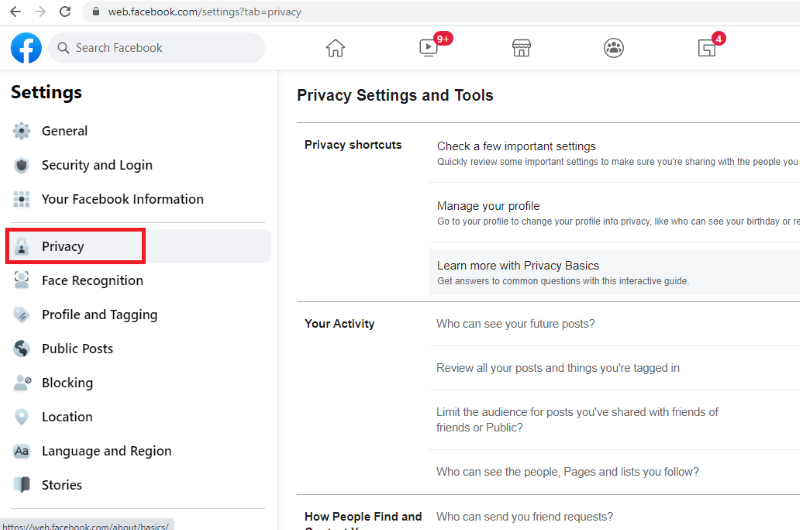
The first and most crucial measure you can take is to ensure that only individuals you trust are seeing your Facebook content. The appropriate options may be found under the Privacy tab of the Settings menu. You can control who may view your posts, issue you friend requests, and use other search engines to discover you.

Set all settings to “Friends” for maximum protection, so that only individuals you know may view your information. Some options can be marked “Only Me” to make them fully private. You may also opt to only show information to certain friends. If you’ve been on Facebook for a long time and don’t want new friends, coworkers, or employers to see your old posts and photographs, the Limit Past Posts settings can help.

Also, make full use of Facebook’s security settings. Through this, Facebook lets you make it harder for anyone else to gain access.

Facebook is a preferred social media site that helps people to stay connected with the world. With the use of Facebook and a reliable internet, people are able to exchange information faster than ever before. As a result, many users have adopted the use of Facebook for personal as well as business purposes.

But as the world is getting bigger and the more we move online, the bigger the cyber threats are getting. It is no longer a secret that social media such as Facebook is a huge target for online intruders. No matter how careful you are, there’s always a possibility of being hacked.

It’s important that we keep our Facebook accounts secure. In this article, you shall learn various aspects of how you can secure your Facebook account.

How to Secure Your Facebook Account

You can use the following security tips to have a secure Facebook account and ensure that your personal information isn’t exposed.

1. Make Sure That Everything Is Set In Private

The first and most crucial measure you can take is to ensure that only individuals you trust are seeing your Facebook content. The appropriate options may be found under the Privacy tab of the Settings menu. You can control who may view your posts, issue you friend requests, and use other search engines to discover you.

Set all settings to “Friends” for maximum protection, so that only individuals you know may view your information. Some options can be marked “Only Me” to make them fully private. You may also opt to only show information to certain friends. If you’ve been on Facebook for a long time and don’t want new friends, coworkers, or employers to see your old posts and photographs, the Limit Past Posts settings can help.

Also, make full use of Facebook’s security settings. Through this, Facebook lets you make it harder for anyone else to gain access.

Screengrab from Facebook

2. Secure Your Log-In

You can use the Facebook password manager to protect your own credentials and avert having your Facebook account hacked. It is risky to use the same password for all of your accounts. Once a hacker has gained access to one of your accounts, they will have little trouble gaining access to all of your others. For all of your accounts, including Facebook, a password manager will create and store unique a strong password. In the event of a security compromise, both your Facebook and other accounts will be safe.

Enabling two-factor authentication is another smart way to prevent someone from accessing your account without your consent. This is available in the Security and Login tab of the Settings menu. Activate and manage your alerts. Make sure login alerts and approvals are activated so that you’re alerted if someone logs in to your account from a different device.

You can have an extra code sent to you via text message whenever you need to access your account from a new device, generate codes through an authentication app like Google Authenticator (for Android and iOS).

3. Organize Your Friends’ List

It’s important to remember that not everything you publish will be appropriate for everyone on your friend list. Fortunately, Facebook allows you to divide your friends’ list into multiple groups. When you make a post, you may select which groups will be able to see it.

Selecting each friend manually and putting them on your selected list might be a time-consuming procedure when segmenting your list. You will, however, have complete control over your carefully crafted friends list once it is completed.

It’s also a good idea to consider who has access to your friends’ list. Your friends list is a comprehensive database of individuals you know. Your friends’ list exposes a lot about you, from friends to family to workplace. You may conceal your friends’ list from everyone except yourself, your current friends, or chosen friends to prevent others from seeing it.

4. Take Charge of Tagging

One of the most difficult aspects of protecting your Facebook privacy is that you have no control over what others write. While you may not be able to erase another person’s photo or post about you, you may manage what you’re tagged in. These options may be found in the Settings section of the Timeline and Tagging page.

As you can see, you may limit who can publish to your timeline and who can see Facebook posts you’ve been tagged in with these options. Turn on the Review settings to see everything that’s been said about you before it’s shared with your friends.

5. Recognize Friend Requests

Many individuals are unaware that until you approve or delete a Facebook friend request, the person receiving it will be able to see information about you on your profile and in their news feed.

In the Privacy tab of Settings, you may change your availability to accept friend requests, but it’s a good idea to look through your existing requests and update any you’ve been ignoring. Don’t accept friend requests from people you don’t know Scammers may create fake accounts to friend people.

Also, you can choose trusted contacts in case you lose access to your account. Trusted contacts are friends that can help you get back into your Facebook account if you ever lose access.

6. Examine the Apps You’re Using

You provide third-party access to reams of critical data every time you take a fun quiz, play a game on Facebook, or check in to an app using your profile. This is dangerous in and of itself, but it becomes even more so when you consider the recent data breaches linked to Facebook.

Remove any current connections you no longer wish to accept from the Applications and Websites page under Settings to ensure that no unauthorized apps or sites have access to your account.

7. Use VPN To Hide Your Location

Unless you have all location settings deactivated on all of your devices, Facebook will always have access to your location via its app on those devices, even if you turn off your location history (in the Location tab under Settings).

Using a VPN is the only method to prevent your physical location and digital movements from being traced. A VPN encrypts all of your internet traffic and passes it via a private server in a separate physical location, hiding your true location from any social networking site or app.

Make sure to secure your Facebook account via Streamtech

With the rise of social media, we’re seeing more people becoming cyber-crime victims. It’s important to stay vigilant and take steps to protect your Facebook account. It is important to protect your personal information and be careful with whom you share your details. In order to help secure your Facebook account, it is equally vital to be equipped with a fiber home internet from a trusted internet provider in the Philippines.

With Streamtech, you can get the best value for your money as we provide the best and most reliable internet experience for residential subscribers. We have very affordable fiber services that will enable you to keep up with this digital age. For your homes, you can get up to 25 Mbps speed of internet for as low as PhP 1,499.

Find out whether our fiber network is available in your area. View our branches and locations. You may also search for Streamtech Internet on Facebook to know more about our products and services.